How seshka works, and what it can do
seshka is a macOS menu bar app that kills what Claude Code sessions left running, ends the ones you forgot, cleans up what they left on disk, and keeps your Mac awake while Claude is still working. This page covers all of it.
Install
Download the disk image, open it and drag Seshka to Applications. It needs macOS 14 or later and runs on Apple silicon and Intel. The app is signed and notarized by Apple.
seshka lives in the menu bar: a small doll near the clock. The doll is open while closed sessions have left something running, with the number of processes next to it, and closed when your Mac is clean. Click it to open the menu. The first time it runs, a short tour shows where it is and what each tab does.
It keeps itself up to date. A new version is downloaded in the background, announced with a notification and a red dot on the doll, and installed when you click Restart now or the next time seshka quits. To have it start with your Mac, turn on Launch at login in Settings.
Leftover processes
When a Claude Code session ends, what it started often does not: a dev server, a file watcher, a test runner, an emulator, a browser opened by Playwright. They keep their memory and their ports. The Leftover tab lists every such process, grouped by the session that started it.
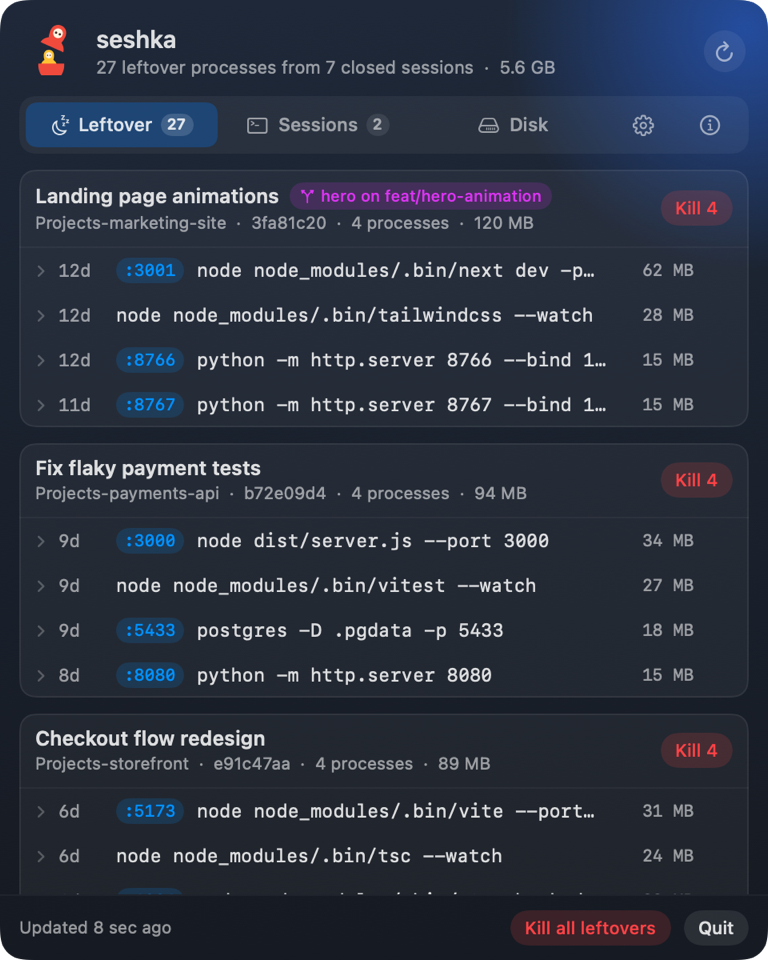
Each row shows how long the process has run, the port it listens on, its command and its memory. Click a row for its full command, folder and PID. A session that worked in several git worktrees gets a group for each, tagged with the worktree.
Killing
- One process: the button on its row.
- One session's worth: Kill, on the session's card.
- Everything: Kill all leftovers, at the bottom. It asks once before it does.
seshka asks each process to stop and gives it two seconds before forcing it. Afterwards it tells you how much memory came back.
Protecting a process
Some things should outlive every session: a virtual machine, a database you keep running. Open its row and click Protect, or add a word from its command to Protected in Settings. A protected process shows a lock and is skipped by Kill all and Kill session. To kill it after all, unprotect it first.
Sessions
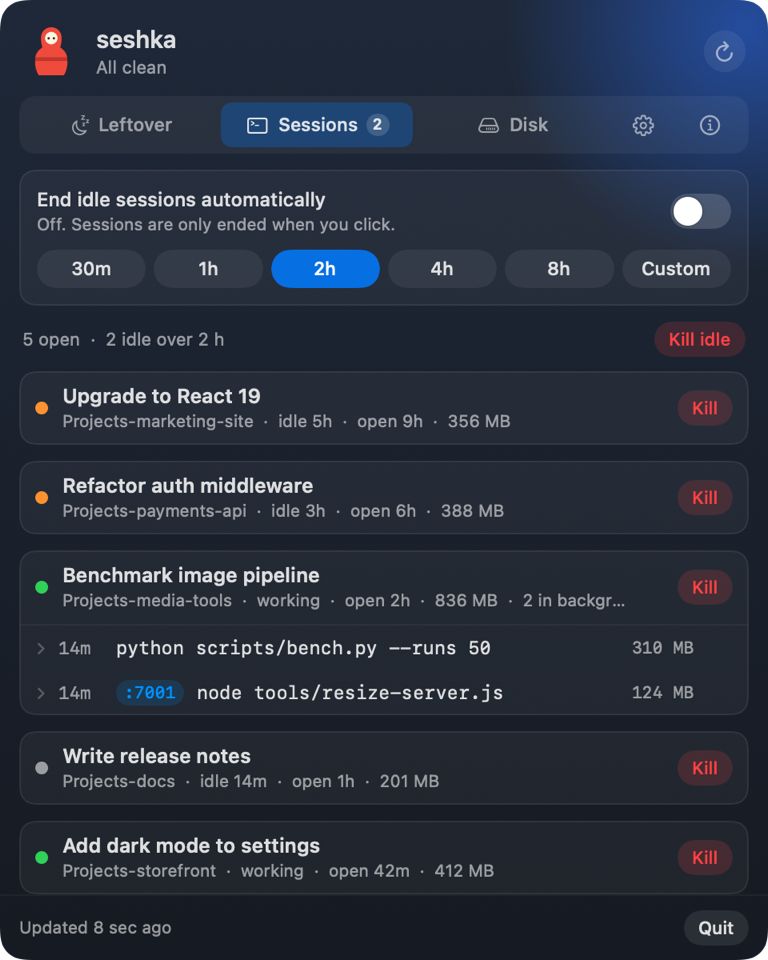
The Sessions tab shows every Claude Code session that is open: whether it is working or waiting for you, for how long, how much memory it holds, and what it has running in the background.
Ending idle sessions
A session left open and forgotten keeps hundreds of megabytes. Pick how long a session may wait (two hours unless you change it), and Kill idle ends every session that has waited longer. Turn on End idle sessions automatically and seshka does it by itself. A session that is working is never taken for idle, and killing one by hand asks first.
Bringing a session back
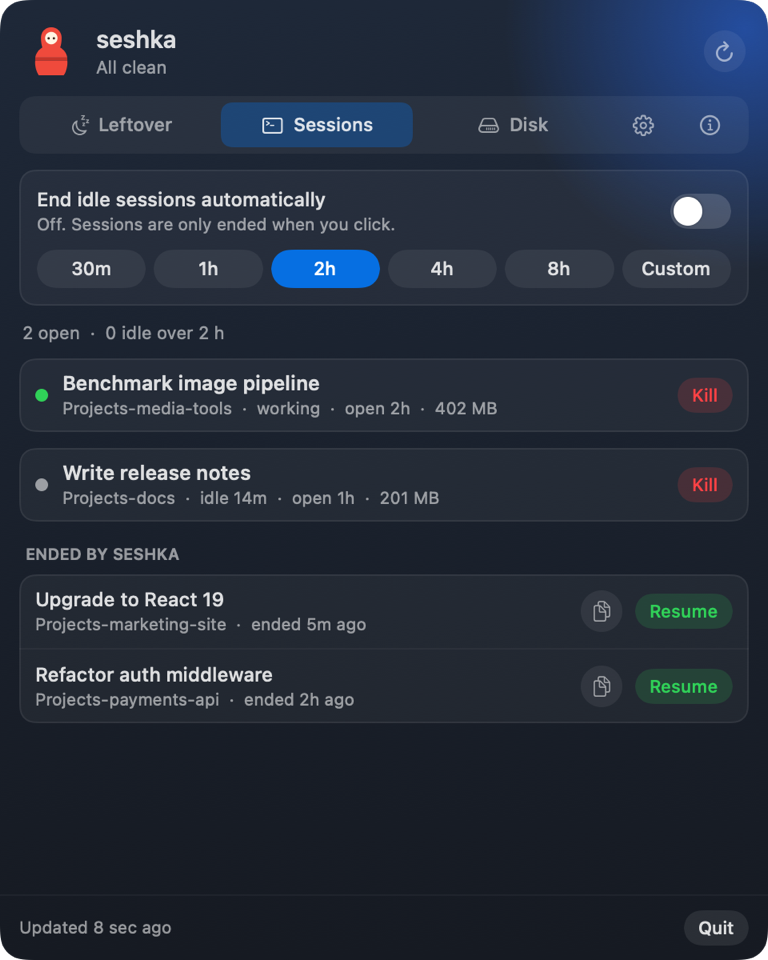
Ending a session closes the Claude Code process, not the conversation. Every session seshka ended stays listed under Ended by seshka for three days. Resume opens a terminal in the session's folder with claude --resume running for exactly that session. It uses the terminal the session ran in when that is Ghostty, iTerm or Terminal, and otherwise the one your Mac opens .command files with. The button next to it copies the command instead.
Disk
Sessions leave things on disk too. The Disk tab shows what can go and how much room each takes.
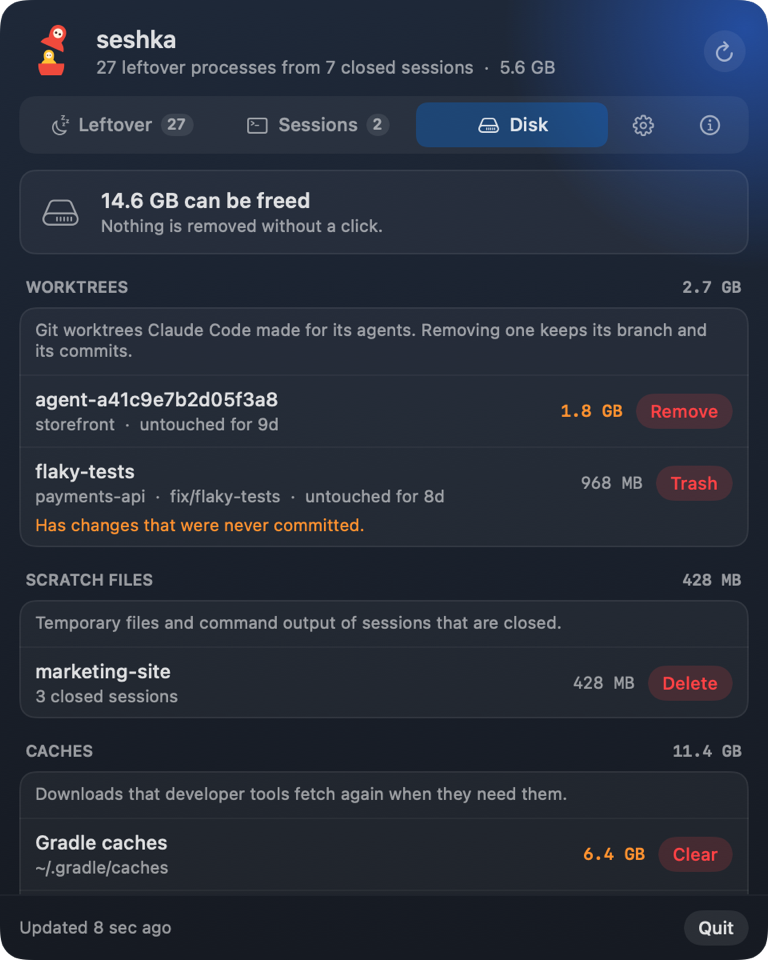
- Worktrees: the git worktrees Claude Code made for its agents. Removing one keeps its branch and its commits. One with changes that were never committed goes to the Trash instead of being deleted.
- Scratch files: temporary files and command output of sessions that are closed.
- Caches: downloads that developer tools fetch again when they need them, such as Gradle, pnpm, Yarn and Homebrew. Only caches a tool refills by itself are offered, so clearing one never leaves something broken.
Nothing is removed without a click, and nothing in use is offered: not a worktree a session or a process is running in, and not the scratch files of a session that is open or wrote to them within the hour.
Lid closed
Closing a MacBook's lid puts it to sleep, in the middle of whatever Claude was doing. Turn on Keep working with the lid closed in Settings and seshka keeps the Mac awake for as long as a session is working, and lets it sleep about a minute after the last one finishes.
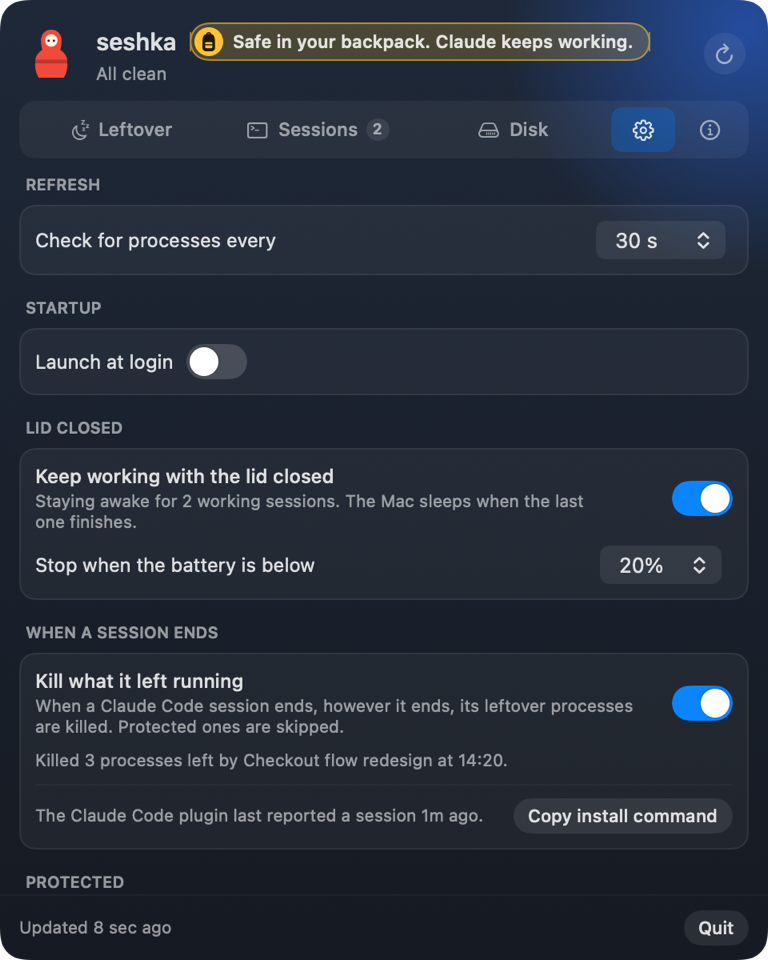
While it is holding the Mac awake, a sign next to the name says so: Safe in your backpack. Claude keeps working.
- It stops below the battery level you pick (20% unless you change it), and when the Mac runs hot.
- Sleep is switched back on when the last session finishes, and when seshka quits.
- If seshka is killed while sleep is off, it puts it back the next time it starts. Restarting the Mac does too.
/etc/sudoers.d/seshka-lid, that allows that one setting and nothing else. Remove, in Settings, takes the rule away again.The week in numbers
seshka counts what it cleaned up: memory freed, processes killed, sessions ended, disk cleaned. The last seven days are summed up on the About tab and on the Leftover tab when it is empty. Share makes a picture of it that you can copy, save or post.
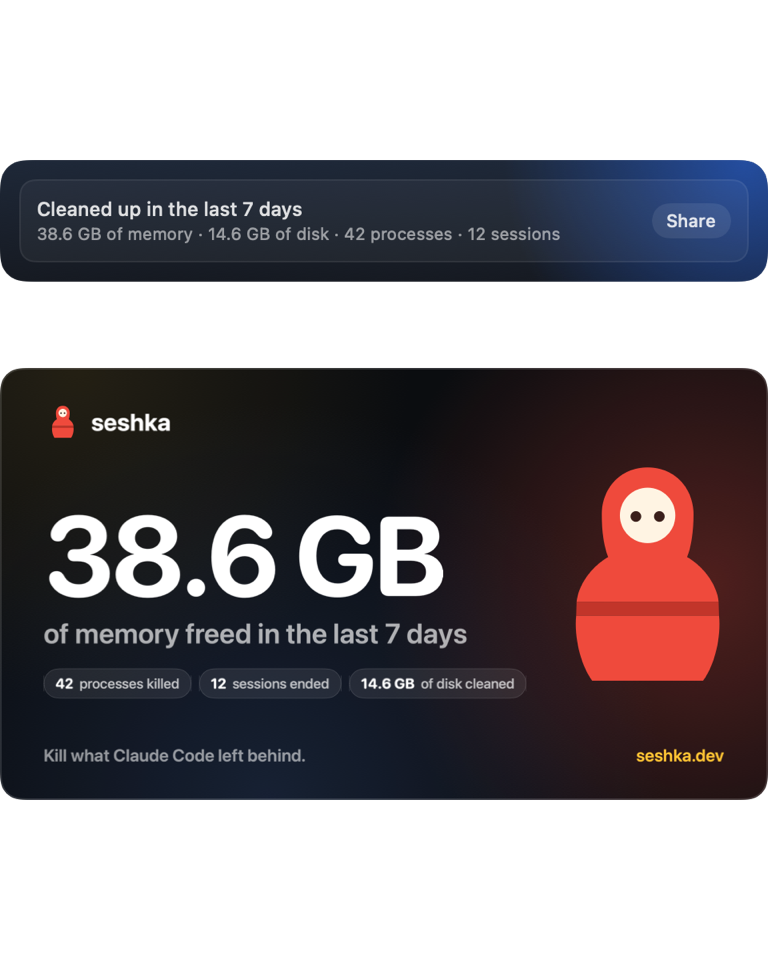
Only numbers are counted and only numbers are on the picture: never a project, a session or a folder name.
The Claude Code plugin
seshka works on its own. Its plugin for Claude Code ties the two together, so that Claude Code tells seshka what happens and Claude knows what seshka sees. It needs seshka 0.6.0 or newer.
Install
Inside Claude Code:
/plugin install seshka --marketplace jigjoy-ai/seshka
Or from a terminal:
claude plugin marketplace add jigjoy-ai/seshka
claude plugin install seshka@seshka
It takes effect in the sessions you start afterwards. Settings in seshka shows when the plugin last reported a session.
Leftovers killed when a session ends
Turn on Kill what it left running in Settings, under When a session ends. From then on, the moment a session ends, seshka kills what it left behind, a few seconds later. It works however the session ends: /exit, a closed terminal window, a closed tab. Protected processes are skipped, and Settings shows what was last killed and when.
kill -9, or by Claude Code crashing, never gets to say that it ended. What it left is found the way seshka has always found it, and waits on the Leftover tab.Claude knows what was left behind
When a session starts in a folder where earlier sessions left something running, Claude is told at the start: which process, on which port, how much memory, for how long. It no longer has to work out why port 3000 is taken. Nothing is said when nothing is left, or when seshka is not running.
Two commands
/seshka:statuslists what closed sessions left running. Claude may also run it on its own, when a port turns out to be in use./seshka:cleankills it, except what you protected. Only you can start this one.
Add here to either for this project only: /seshka:clean here.
How it does it
The plugin is three small shell scripts, in the claude-plugin folder of the repository. When a session ends, one leaves an empty file named after the session in ~/Library/Application Support/Seshka/ended, which seshka watches. When a session starts, another reads the list seshka writes after every scan. The commands run seshka's own command line. Nothing is sent anywhere.
How it finds them
Claude Code sets CLAUDECODE=1 in the environment of everything it starts, along with the ID of the session and of its own process. seshka reads those from your running processes. A process is a leftover once the Claude Code process that started it is gone.
Where that mark cannot be read, seshka goes by other traces:
- What a marked process started. Chrome hides its environment, so a browser opened by Playwright is listed next to the Playwright process that opened it. An app's helper processes are folded into one row with the app.
- Where it writes. Claude Code sends each command's output to a file in a folder named after the session. A process still writing there says whose it is.
- Its children. The mark is handed down from parent to child, so a parent whose child shows it had it too: the script that keeps restarting a server is listed with the server.
- Its process group. Claude Code starts every command in a group of its own. seshka notes the group when an open session starts a command, and knows the process later, even with no parent and no mark left.
The last one only works for commands started while seshka is running. A program that leaves its group on purpose, as ssh -f and other daemons do, cannot be told from any other process and is not listed.
What it reads and keeps
Nothing about your sessions, processes or files leaves your Mac. seshka reads them where they are. The only thing it fetches is its own update.
- It reads the list of your running processes and their environment, and Claude Code's own records of its sessions in
~/.claude: which are open, their titles, and whether each is working or idle. - It keeps, in
~/Library/Application Support/Seshka, a count per day of what it cleaned up, in numbers only, and, for the plugin, the current list of leftover processes. - It changes one system setting, and only if you turn on the lid feature: whether the Mac may sleep.
seshka is open source under the MIT license. All of the above can be read in its code.
Questions and answers
Not on its own. Out of the box seshka kills only what you click. What an open session is running is never on the Leftover tab, and a process you protect is skipped by Kill all and Kill session. The two automatic switches, for idle sessions and for a session's leftovers, are off until you turn them on.
No. Ending a session closes the Claude Code process, not the conversation, which stays where Claude Code keeps it. The Resume button next to it, or claude --resume, brings it back with everything said so far.
Nothing about your sessions, your processes or your files. seshka reads them where they are and sends them nowhere. The one thing it fetches is its own update, from seshka.dev, about once an hour. The download count on this site is the number of times the disk image was fetched.
Only if you turn on Keep working with the lid closed. Keeping a Mac awake with its lid shut takes a setting that needs an administrator, so seshka asks once and adds a rule that allows that one setting and nothing else. Settings has a button that removes the rule again. Nothing else in seshka needs a password.
seshka lists what it can tie to a Claude Code session. A program that detaches itself completely, as ssh -f and other daemons do, and whose environment macOS hides, leaves nothing that says where it came from, unless seshka was running and saw it start. Containers started with Docker belong to Docker, not to the session, and are not listed either.
If you started it from inside a Claude Code session, with ! or by asking Claude to, it carries that session's mark and counts as the session's. Protect it, and bulk kills will leave it alone.
No. seshka finds leftover processes without it. The plugin adds three things: a session's leftovers can be killed the moment it ends, Claude is told what earlier sessions left running, and you get /seshka:status and /seshka:clean inside Claude Code.
No. seshka reads the traces Claude Code leaves, and works with Claude Code only.
macOS 14 or later, on Apple silicon and Intel. The lid feature is only offered on a Mac that has a lid.
By itself. It checks about once an hour, downloads a new version in the background, and tells you with a notification and a red dot on its icon. The update is installed when you click Restart now, or the next time seshka quits.
Quit seshka and drag it to the Trash. If you used Keep working with the lid closed, click Remove in Settings first, which takes away the rule it added. What it kept is in ~/Library/Application Support/Seshka, and the plugin is removed with claude plugin uninstall seshka@seshka.
Nothing. seshka is free and open source, under the MIT license.
Something else? Open an issue on GitHub.